🌾Exabytes
1. 登入Exabytes后台
https://billing.exabytes.my/mypanel/clientarea.php (Malaysia 地区)
https://billing.exabytes.com/mypanel/clientarea.php (US 地区)
https://billing.exabytes.sg/mypanel/clientarea.php (Singapore 地区)
2.点击 "Domains" > "My Domains"

3. 找到你的域名后, 点击 "Manage Nameservers"

4. 点击 " Use custom nameservers (enter below)"
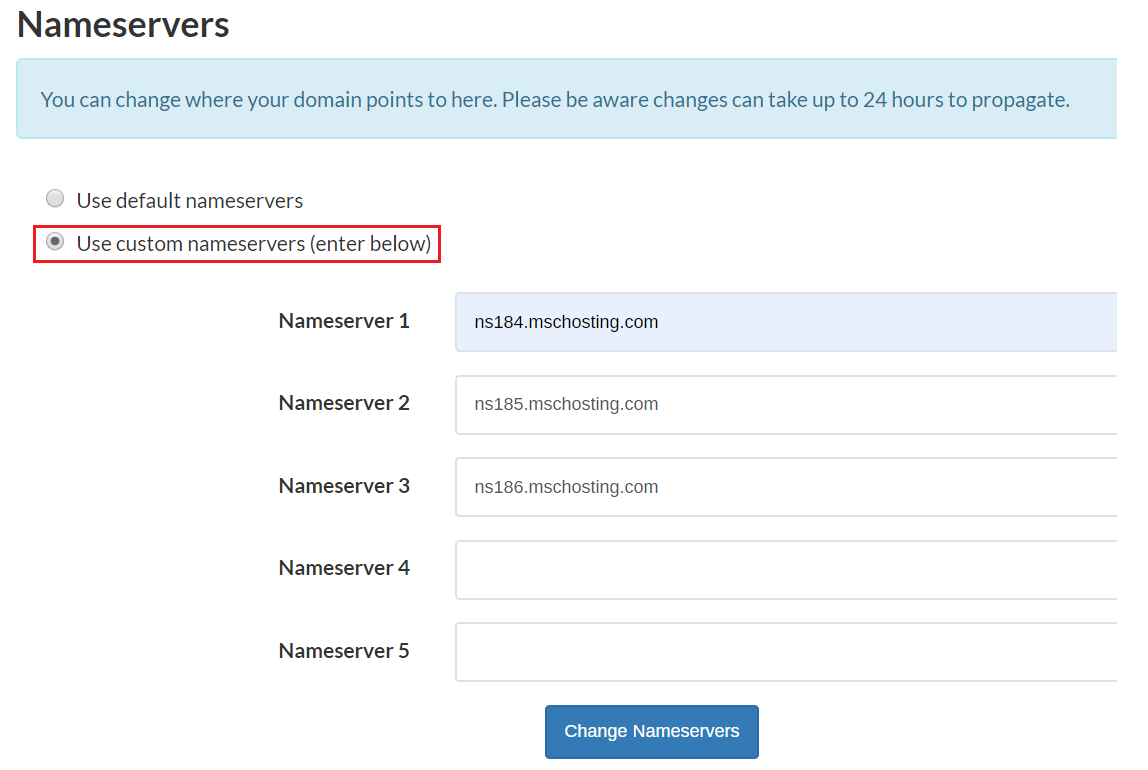
5. 输入指向 Y-Webs 网站的 Nameserver:
Nameserver 1: ns1.dns-parking.com
Nameserver 2: ns2.dns-parking.com
保存完成 !
FAQ:
1.转换域名的时间最慢需要 24 ~ 72 小时
2.如果遇到“名称服务器未注册”的错误,请联系 Exabytes 的支持团队:[email protected]
3.上述方法仅适用于在 Webnic、Enom 和 OpenSRS 域名注册商注册的域名
4.对于 MYNIC 域名(例如 .my、.com.my、.org.my),请从您的主邮箱发送邮件至 [email protected] 进行更新。
Last updated